Tools
SpiderSuite includes specialized tools for encoding, decoding, and comparing web data.
Decoder Tool
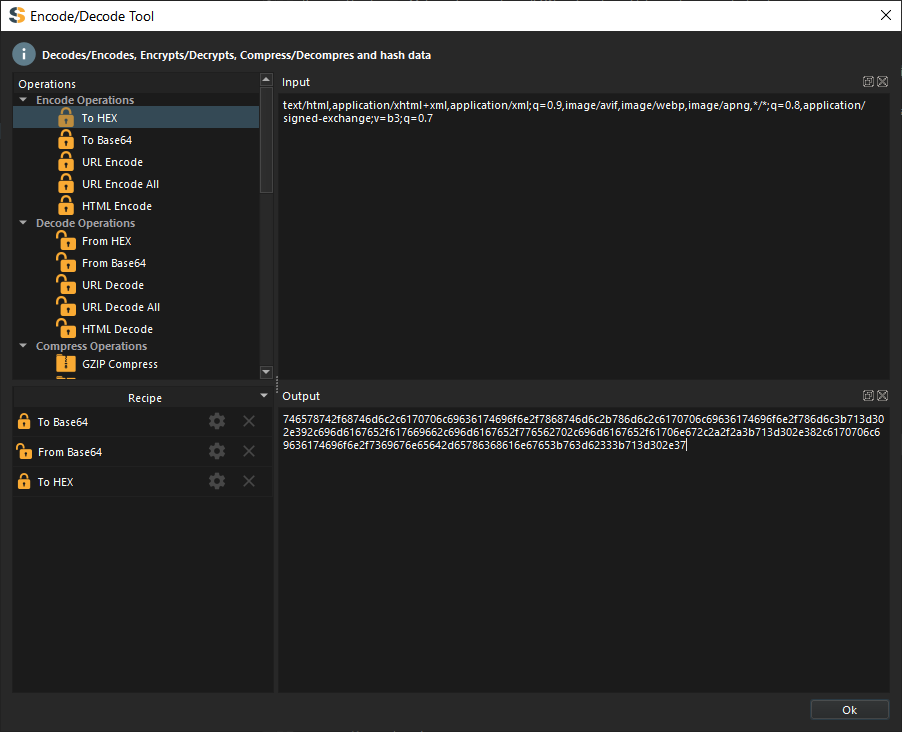
The Decoder Tool provides encoding, decoding, encryption, decryption, compression, decompression, and hashing capabilities.
Overview
The tool uses a Recipe system similar to CyberChef, where you chain multiple operations together. Each operation processes the output of the previous operation.
Interface
The Decoder Tool has three main sections:
- Operations Table - Available operations to choose from
- Recipe Table - Your chain of operations
- Input/Output Panels - Data transformation preview
How to Use
Enter Input Data
Paste or type your data in the Input panel. The data can be:
- Text strings
- Base64 encoded data
- Hex strings
- URL encoded strings
- JSON data
- Any other text-based data
Add Operations
Drag and drop operations from the Operations Table to the Recipe Table.
You can add as many operations as needed - they execute in sequence from top to bottom.
View Results
The Output panel shows the result after applying all recipe operations. The output updates automatically as you modify the recipe or input.
Copy or Export
Copy the output to clipboard or export it to a file for further use.
Available Operations
Encoding Operations
Encoders
- Base64 Encode - Encode data to Base64
- URL Encode - Percent-encode special characters
- Hex Encode - Convert to hexadecimal
- HTML Entity Encode - Encode HTML special characters
- Unicode Encode - Convert to Unicode escape sequences
Decoding Operations
Decoders
- Base64 Decode - Decode Base64 strings
- URL Decode - Decode percent-encoded URLs
- Hex Decode - Convert hex to text
- HTML Entity Decode - Decode HTML entities
- Unicode Decode - Decode Unicode escapes
Encryption Operations
Encryption
- AES Encrypt - Encrypt with AES algorithm
- DES Encrypt - Encrypt with DES algorithm
- RSA Encrypt - Public key encryption
- ROT13 - Simple character substitution
Decryption Operations
Decryption
- AES Decrypt - Decrypt AES encrypted data
- DES Decrypt - Decrypt DES encrypted data
- RSA Decrypt - Private key decryption
- ROT13 - Reverse ROT13 encoding
Hashing Operations
Hash Functions
- MD5 - Generate MD5 hash
- SHA1 - Generate SHA-1 hash
- SHA256 - Generate SHA-256 hash
- SHA512 - Generate SHA-512 hash
- HMAC - Hash-based message authentication
Compression Operations
Compression
- Gzip Compress - Compress with gzip
- Deflate Compress - Compress with deflate
- Brotli Compress - Compress with Brotli
- Gzip Decompress - Decompress gzip data
- Deflate Decompress - Decompress deflate data
- Brotli Decompress - Decompress Brotli data
Compare Tool
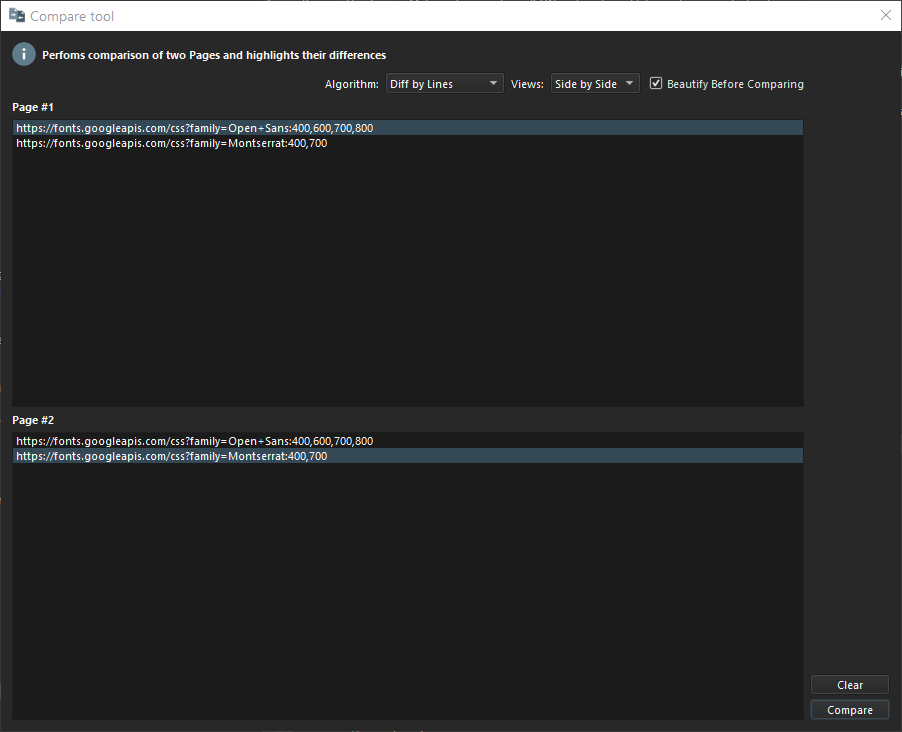
Compare two pages to identify differences and similarities. Analyze differences between two individual pages.
Selecting Pages for Comparison
Send First Page
Right-click on a page in Sitemap, History, or Graph view.
Select To Compare from the context menu.
Both pages are now loaded in the Compare Tool.
Configuring Comparison
Before running the comparison, configure these settings:
Comparison Target:
- Request comparison
- Response comparison
Comparison Algorithm:
- Character-by-character (exact matching)
- Word-by-word (ignores whitespace differences)
- Line-by-line (good for formatted content)
View Mode:
- Side-by-side view
- Unified view
Running Comparison
Select the pages to compare from the dropdowns.
Choose comparison algorithm and view preference.
Click [Compare] button to start comparison.
Wait for processing to complete. Results appear in a new dialog.
Understanding Results
The comparison results highlight:
Visual Indicators
- Green highlighting - Content added in second page
- Red highlighting - Content removed from first page
- Yellow highlighting - Content modified between pages
- No highlighting - Content identical in both pages
Use Cases
Testing Changes
Compare the same page before and after making changes:
- Crawl the site
- Make changes to the website
- Re-crawl
- Compare old vs. new versions
A/B Testing
Compare different versions of a page:
- Different user agents
- Logged in vs. logged out
- Different user roles
- Geographic variations
Finding Differences
Identify what changed between:
- Development and production environments
- Different API versions
- Different language versions
- Mobile vs. desktop responses